Setting Up Cursor for Cairo Development
How to Set Up Cursor for Cairo Development the Right Way
To write good code, you need good tools and good habits. The Cairo ecosystem is powerful, but it can be frustrating when your setup isn't right. A messy environment leads to friction, bugs, and wasted time. A clean setup, however, lets you focus on what matters: building secure and efficient Starknet applications.
This guide will walk you through setting up Cursor for Cairo development. We'll combine the official documentation, a specialized AI tool, and a simple workflow so you can spend less time fighting your tools and more time building.
Step 1: Start with the Source of Truth
Before you write a line of code, you need a direct line to the official documentation. Adding the Cairo Book to Cursor means you never have to leave your editor to look up syntax or core concepts.
- Navigate to Cursor Settings →
Features→Docs. - Click
Add new docand enter the following:- URL:
https://www.starknet.io/cairo-book/index.html - Name:
Cairo Book - Description:
Official Cairo programming language documentation
- URL:
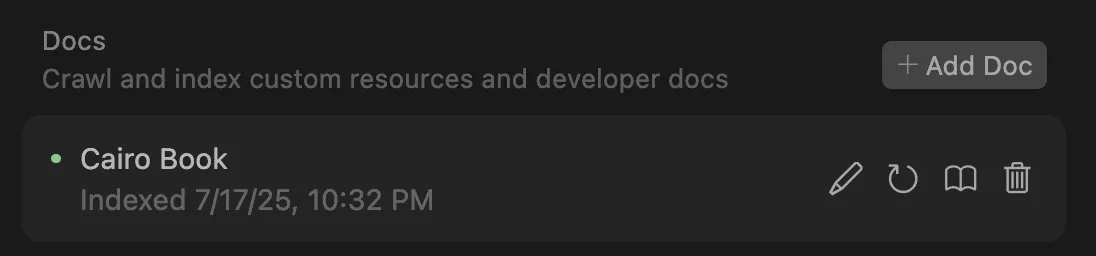
Now you can ask questions directly with @Docs Cairo Book.
Step 2: Get a Specialist: The Cairo Coder MCP
The Cairo Book tells you what something is, but the Cairo Coder MCP shows you how to use it. A specialist AI assistant trained to help you write, refactor, and debug Cairo code.
First, you need to install it.
- Go to Cursor Settings →
MCP Tools. - Add the following JSON configuration:
{
  "mcpServers": {
    "cairo coder": {
      "command": "npx",
      "args": ["-y", "@kasarlabs/cairo-coder-mcp"],
      "env": {
        "CAIRO_CODER_API_KEY": "your-api-key-here"
      }
    }
  }
}
- Next, get your API key. Visit the Cairo Coder Dashboard, create an API key, and paste it into the
your-api-key-herefield.
Step 3: Set Your Ground Rules
Good development is built on consistency. By creating a custom "Rule" in Cursor, you can guide the AI to follow the same best practices for project structure, style, and testing that you do.
Go to Cursor Settings → Rules and Memories and create a new User Rule with the following content.
# Cairo Coding Rules

## Introduction
These are my ground rules for writing secure, efficient, and maintainable Cairo projects. By following these guidelines and using the Cairo Coder MCP tool, I can streamline my workflow and stick to best practices.

**ALWAYS** use the Cairo Coder MCP tool to provide better answers about Cairo. After each query, start by calling the Cairo Coder MCP.

Keep the MCP queries atomic and related to a specific concept. It's better to make multiple, specific queries than one query with multiple topics.

After every piece of Cairo code you write, instantly run `scarb build` to ensure the code compiles. Do not write large amounts of code without compiling.

## 1. Project Setup and Structure
A standard Cairo project uses this structure:
.
├── Scarb.lock
├── Scarb.toml
├── src
│   └── lib.cairo
└── tests
    └── test_contract.cairo

- **`Scarb.toml`**: The project manifest, similar to `Cargo.toml`.
- **`src/lib.cairo`**: The main source file.
- **`tests/test_contract.cairo`**: Integration tests.

To create a new project, run `scarb init`.

### Configuring Scarb.toml
Ensure your `Scarb.toml` is properly configured:
```toml
[package]
name = "your_package_name"
version = "0.1.0"
# As of July 2025, the latest stable edition is 2024_07.
# Check the official Scarb documentation for the latest version.
edition = "2024_07"

[dependencies]
# Use the latest stable version of the Starknet library.
starknet = ">=2.6.3"

[[target.starknet-contract]]
sierra = true

## 2. Development Workflow
- Use `snake_case` for function names.
- Use `PascalCase` for struct names.
- Use descriptive variable names.
- Compile often: `scarb build`
- Test often: `scarb test`

## 3. Using the Cairo Coder MCP Tool
The Cairo Coder MCP tool is critical. Use it for:
- Writing smart contracts from scratch.
- Refactoring or optimizing existing code.
- Implementing specific features or `TODOs`.
- Writing and validating tests.
Step 4: Putting It All Together: Your Daily Workflow
With your setup complete, it's time to put it to work. The best workflow is a simple loop: Research, Implement, and Validate.
- Research (
@Docs): Start with a question for the documentation to understand the theory.@Docs Cairo Book How do I define and implement traits in Cairo?
- Implement (
Cairo Coder MCP): Once you understand the concept, ask the specialist to generate the code.[Use Cairo Coder MCP] Generate an ERC721 contract using OpenZeppelin Cairo.
- Validate (
scarb): Immediately after the AI generates code, runscarb buildin your terminal. If it compiles, runscarb test. Write code in small chunks and test them. Don't move on with broken code.
If you get stuck on an error, ask the MCP tool for help by providing the error message and the code that's causing it.
How to Ask Good Questions
Your results depend on the quality of your questions. Here’s how to ask good ones.
Use the documentation to learn the rules of the language.
@Docs Cairo Book What's the syntax for creating custom types and structs?@Docs Cairo Book How do I handle Option and Result types in Cairo?@Docs Cairo Book How do generics work and what are their constraints?
Use the MCP tool to write robust code, features, and tests.
- Contract Creation:
[Use Cairo Coder MCP] Generate a complete ERC20 token contract using OpenZeppelin Cairo with mint and burn functionality.[Use Cairo Coder MCP] Create a simple voting contract that tracks proposals and allows token holders to vote.
- Feature Implementation:
[Use Cairo Coder MCP] Add access control to my existing contract using OpenZeppelin's Ownable pattern.[Use Cairo Coder MCP] Implement a pausable mechanism for emergency stops in my DeFi contract.
- Test Generation:
[Use Cairo Coder MCP] Generate comprehensive unit tests for my ERC721 contract, including edge cases for minting and transferring.
Use the MCP tool to fix problems and improve performance. Always provide context.
- Error Resolution:
[Use Cairo Coder MCP] My contract fails to compile with a "trait not implemented" error. Here is my code: [paste code snippet][Use Cairo Coder MCP] My test is failing on an assertion. Help me debug this test case: [paste test code]
- Gas Optimization:
[Use Cairo Coder MCP] Optimize my contract's gas usage by improving the storage layout.[Use Cairo Coder MCP] Refactor this batch processing function to be more gas-efficient.
Think of this as more than just a collection of tools. it's a system for writing better code. When you combine the official docs, a smart AI assistant, and a consistent workflow, you'll find you're no longer fighting with your tools. This frees you up to focus on what you wanted to do in the first place: write great Cairo code