Private Transfers and ZK Credentials on Starknet
Time to complete: 30 minutes (Codespaces) or 1 hour (local setup)
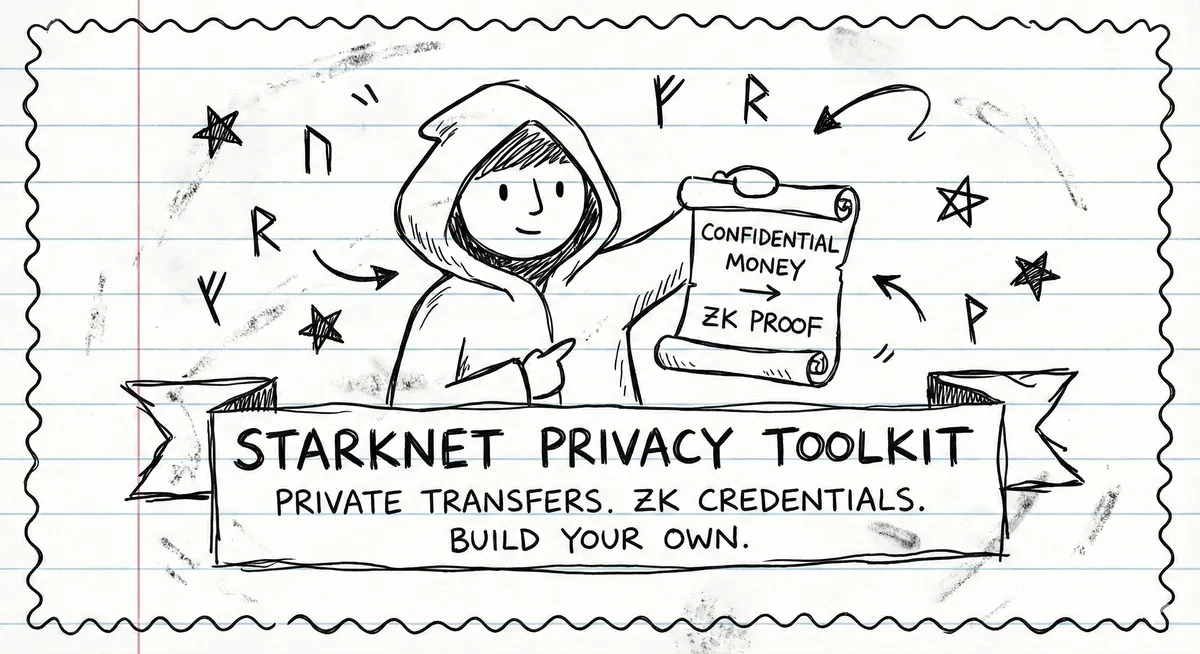
TLDR. Privacy on Starknet is finally practical. Tongo gives you encrypted balances. Garaga + Noir lets you prove arbitrary facts about private data in ~10 lines of circuit code. The infrastructure handles the hard parts. Fork this repo and build what's missing.
Repo here: https://github.com/starknet-edu/starknet-privacy-toolkit
Blockchain privacy is broken. Every transfer, every balance — permanently visible. This is great for trustlessness but catastrophic for real world use. What follows is a working toolkit that changes this: private transfers with selective disclosure.
I built it as a donation badge system. But the pattern is general. Age verification, credit scores, token holdings, salary proofs. Same infrastructure, different constraints.
Code and live app
- Repo
- Live app
- Web UI code
- Proof API server
- Tongo client
- Quickstart template
- Minimal snippet
- Noir circuit
- Cairo badge contract
If this helps you, please star the repo.
Deployed contracts
- Verifier: 0x022b20...2669 on Sepolia
- Badge: 0x077ca6...7010 on Sepolia
- Tongo mainnet: 0x00b921...0a16 USDC
- Tongo Sepolia: 0x00f34d...5f8a STRK
The fastest way to use this
gh repo fork starknet-edu/starknet-privacy-toolkit
git clone https://github.com/starknet-edu/starknet-privacy-toolkit.git
cursor starknet-privacy-toolkit
Then tell the AI what you want: "Change this donation badge to verify credit scores above 700" or "Make this prove someone is over 18 without revealing their birthdate."
The circuit is 10 lines. The contract is 30 lines. Everything else is plumbing. You modify the small parts, the plumbing stays the same.
1. The privacy problem
Every transfer, every balance, every interaction. Permanently public. This is great for trustlessness but terrible for privacy. You can't donate to politically sensitive causes without that being traceable. You can't pay for sensitive services privately. Your entire financial life is an open book.
Zero knowledge proofs fix this. As Eli Ben-Sasson (StarkWare cofounder) puts it: "ZK has two super powers: Privacy and Scalability." The elegant part: you can prove statements about data without revealing the data itself. "I donated at least $100" is provable without showing that you actually donated $847.
Two pieces make this work:
Tongo handles private transfers. You deposit tokens, and they become encrypted. You transfer them, amounts stay hidden. Only you and the recipient know.
ZK Credentials let you prove things about your private data. Built with Noir (circuit language), Barretenberg (proof generator), and Garaga (Starknet verifier).
2. What you can build
The donation badge is just one example. The same pattern works for anything where you want to prove X without revealing Y:
- Donation badge: prove you gave above a threshold, hide the exact amount.
- Credit score: prove score above 700, hide the actual score.
- Age verification: prove over 18, hide birth date.
- Accredited investor: prove net worth above 1M, hide actual wealth.
- Token holder: prove you hold more than 100 tokens, hide exact balance.
- Salary proof: prove you earn above 50k per year, hide actual salary.
For the donation badge example, I set up three tiers:
- Bronze: ten dollars
- Silver: one hundred dollars
- Gold: one thousand dollars
But again, this is just one instantiation. The infrastructure is what matters.
3. How ZK proofs actually work
Let me break this down because it's actually pretty elegant once you see it.
Step 1: commit
You take your private data and hash it with a random secret:
commitment = Poseidon(private_data, secret)
Think of this like sealing a letter in an envelope. Everyone can see the envelope exists, but nobody can read the contents.
This commitment goes on chain. It's public. But here's the thing: hash functions are one way. Nobody can reverse engineer your data from the commitment. They can verify the commitment later if you reveal the inputs, but they can't figure out the inputs just from seeing the commitment.
Step 2: prove
Now comes the clever part. You run a prover locally. This thing takes about 30 to 60 seconds and produces about eight KB of data. This proof says:
- I know values that hash to that commitment.
- Those values satisfy a constraint, for example amount above a threshold.
The beautiful thing: the proof reveals nothing about the actual values. Not even a hint. It's not encrypted data that could theoretically be decrypted. It's a completely different object that proves knowledge without conveying it.
If commitments are sealed envelopes, proofs are like showing a bouncer a wristband. You can prove you are allowed in without revealing your ID.
Step 3: verify
A smart contract checks the proof. If it's valid, you get your credential. The contract learns that the statement is true. It never learns the underlying data.
This is the core loop. Everything else is implementation details.
4. The ZK pipeline
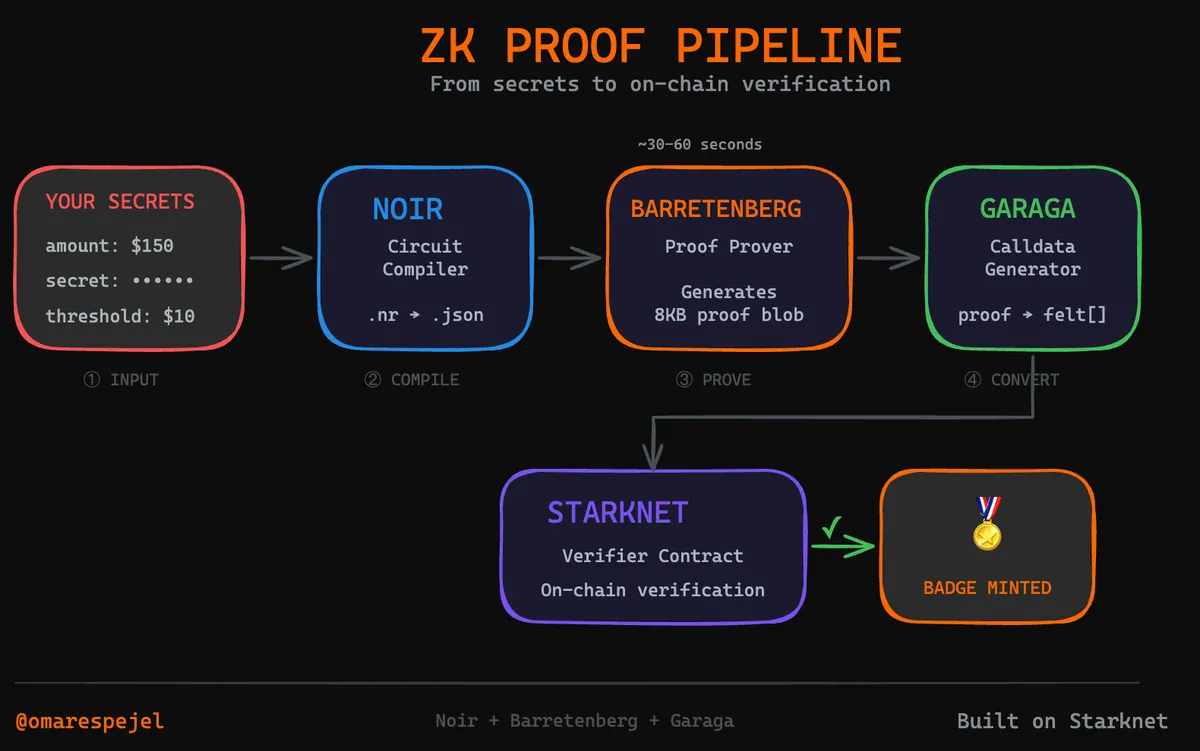
Three tools, each doing one thing well. Noir compiles constraints into arithmetic circuits. Barretenberg takes the circuit plus private inputs and produces a proof. Garaga converts that proof into Starknet calldata. As the Starknet blog explains: "Using Garaga, Noir developers can compile their programs to automatically generate a Cairo verifier, deploy it on Starknet, and verify proofs without writing any Cairo code."
OpenZeppelin puts it crisply:
"Noir abstracts low level cryptographic complexities, allowing developers to focus on logic rather than circuit optimization. Unlike earlier frameworks like Circom or ZoKrates, Noir leverages Rust like syntax and tooling to reduce boilerplate code and human error."
— OpenZeppelin, A Developer’s Guide to Building Safe Noir Circuits
One gotcha: versions matter a lot. These tools are tightly coupled. Use exactly these versions or proofs will fail:
- Noir: 1.0.0 beta 1
- Barretenberg: 0.67.0
- Garaga: 0.15.5
This isn't a bug. It's cryptography. The verifier is compiled for a specific proof format. Different versions = different formats = verification fails.
5. Setup
Why Codespaces:
- Noir, BB, and Garaga are sensitive to OS versions and system libraries.
- Codespaces gives a clean Linux environment that matches the toolchain.
- Fewer local setup surprises means faster onboarding for hackers.
Step by step:
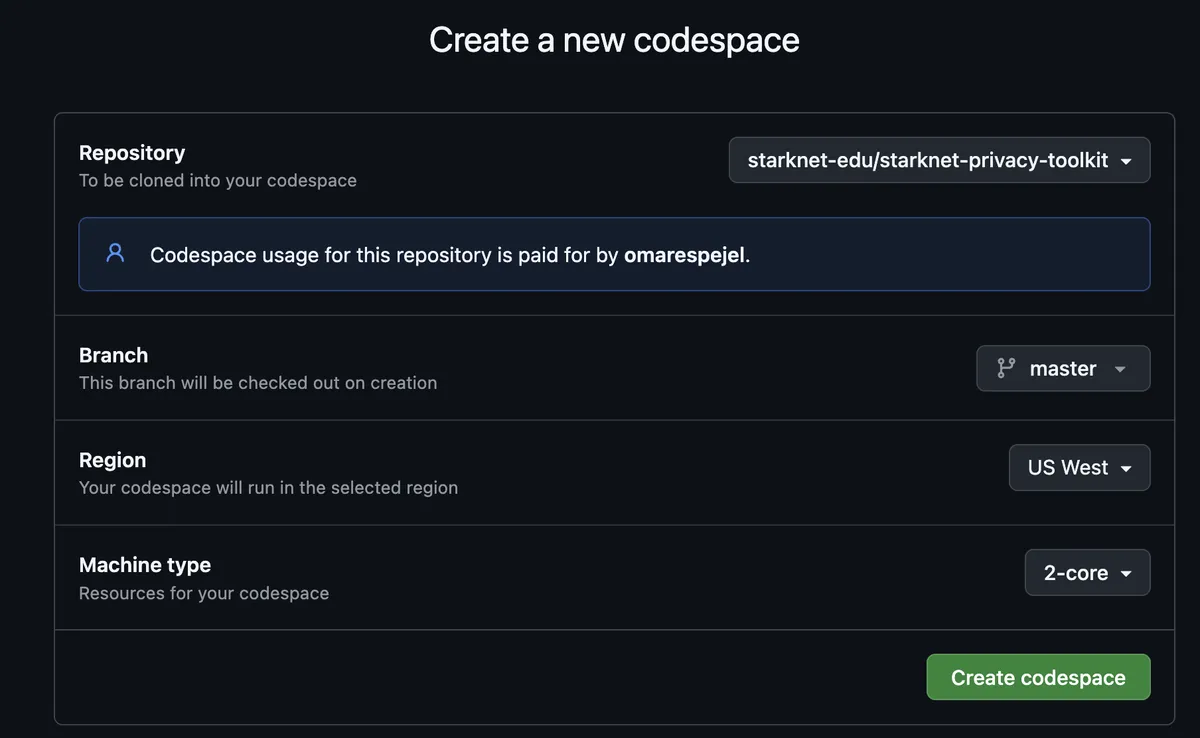
Create a GitHub Codespace on the repo.
Install the toolchain (setup-codespace.sh):
chmod +x setup-codespace.sh
./setup-codespace.sh
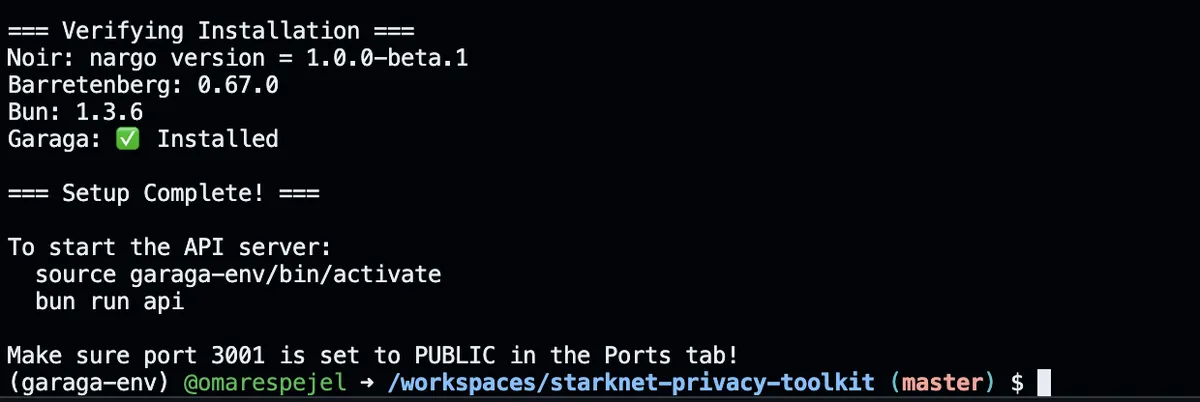
Start the proof API:
source garaga-env/bin/activate
bun run api
You should see:
Proof API running on http://localhost:3001Expose the API port:
- In Codespaces, make port
3001Public so the web UI can call it.
- In Codespaces, make port
(Optional) Start the web UI in another terminal:
bun run dev:web
Open the
5173port URL in your browser.
That's it. Everything is installed. If the script fails, use the Manual installation steps below.
If the UI shows "Proof Server: Offline":
- Make sure port
3001is Public in Codespaces. - Paste your Codespaces URL (e.g.
https://your-codespace-3001.app.github.dev/) into the Proof API URL field in the UI and click Save.
What to do next in 5 minutes
- Start the API: run
source garaga-env/bin/activatethenbun run api - Start the UI:
bun run dev:weband open the5173URL. - In Step 6, paste your Codespaces URL, click Save, then generate a proof with the defaults (amount
150, secret12345678).
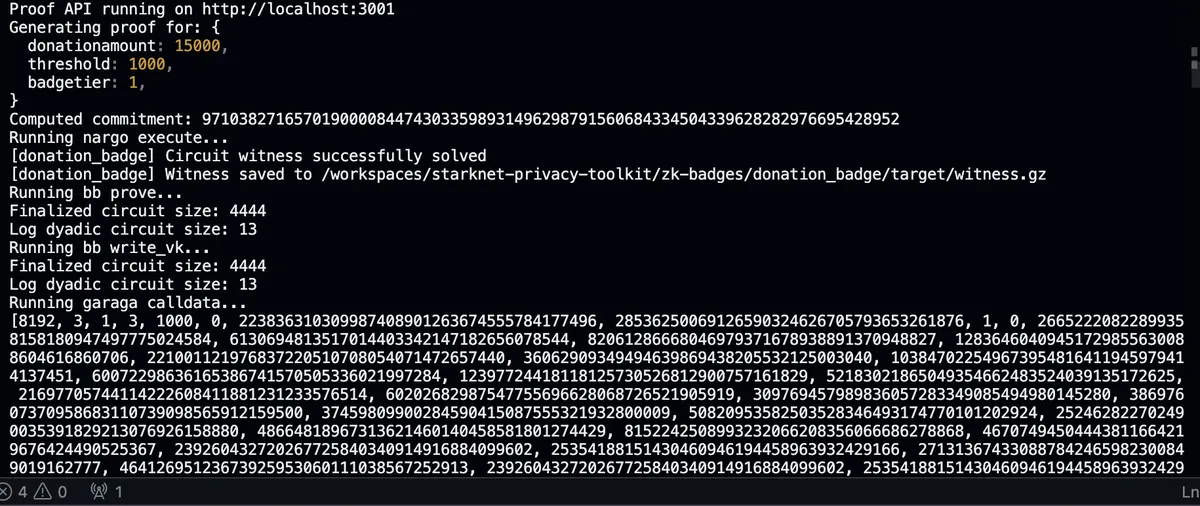
Other useful scripts: bun run check:health (verify setup), bun run template:quickstart (run minimal example), bun run tongo:init (initialize Tongo client).
Manual installation
If you want to run locally:
# Noir
curl -L https://noirup.dev | bash
source ~/.bashrc
noirup --version 1.0.0-beta.1

# Barretenberg
curl -L https://bbup.dev | bash
source ~/.bashrc
bbup --version 0.67.0
sudo apt-get install -y libc++-dev libc++abi-dev

# Garaga (needs Python 3.10 specifically)
sudo add-apt-repository ppa:deadsnakes/ppa -y
sudo apt-get install -y python3.10 python3.10-venv python3.10-dev
python3.10 -m venv garaga-env
source garaga-env/bin/activate
pip install garaga==0.15.5

# Bun
curl -fsSL https://bun.sh/install | bash
If noirup.dev or bbup.dev fails, use these mirrors instead:
curl -fsSL https://raw.githubusercontent.com/noir-lang/noirup/main/install | bash
curl -fsSL https://raw.githubusercontent.com/AztecProtocol/aztec-packages/master/barretenberg/bbup/install | bash
Verify your versions:
nargo --version  # should say 1.0.0-beta.1
bb --version     # should say 0.67.0
6. The circuit
Here's the entire circuit for the donation badge:
use std::hash::poseidon::bn254::hash_2;

fn main(
    threshold: pub u64,
    commitment: pub Field,
    donation_amount: u64,
    donor_secret: Field
) {
    let computed = hash_2([donation_amount as Field, donor_secret]);
    assert(computed == commitment);
    assert(donation_amount >= threshold);
}
That's it. 10 lines.
The pub keyword means "public input". These values are visible to the verifier. threshold and commitment are public. donation_amount and donor_secret are private. They're used to generate the proof but never revealed.
Two assertions:
- The hash of (amount, secret) must equal the commitment
- The amount must be at least the threshold
If both pass, you get a valid proof. If either fails, no proof.
This is what you modify for different use cases. Want age verification? Change donation_amount >= threshold to birth_year <= current_year - 18. Want credit score checks? Change it to credit_score >= 700. The pipeline stays the same.
Testing the circuit
cd zk-badges/donation_badge
nargo test
Compiling the circuit
The circuit config is in Nargo.toml:
nargo compile
Output: target/donation_badge.json
7. Generating a proof
Let's walk through the actual commands.
1. Compute your commitment
Use computecommitment.js:
cd zk-badges
node computecommitment.js 15000 "mysecret123"
# Output: 0x1abc...def (your commitment)
2. Create prover.toml
Replace the placeholder values with your actual commitment from step 1:
threshold = "1000"
commitment = "0x..."  # paste your commitment from step 1
donation_amount = "15000"
donor_secret = "0x..."  # paste the hex of your secret
3. Generate the proof
nargo execute witness

bb prove_ultra_keccak_honk \
  -b ./target/donation_badge.json \
  -w ./target/witness.gz \
  -o ./target/proof

bb write_vk_ultra_keccak_honk \
  -b ./target/donation_badge.json \
  -o ./target/vk
This takes 30 to 60 seconds depending on your hardware. It's doing real cryptography, generating a proof that passes certain mathematical properties without revealing the inputs.
4. Convert to calldata
garaga calldata \
  --system ultra_keccak_honk \
  --vk ./target/vk \
  --proof ./target/proof \
  --format starkli \
  > ../calldata.txt
Or just use generate-proof.sh
./generate-proof.sh --amount 15000 --threshold 1000 --donor-secret "mysecret123" --tier 1
8. The smart contract
Garaga generates the verifier contract automatically from your circuit. You can see the generated honk_verifier.cairo in the repo. You write the application logic around it.
Here's the badge contract:
#[starknet::contract]
mod DonationBadge {
    use starknet::ContractAddress;
    use starknet::get_caller_address;

    #[storage]
    struct Storage {
        verifier_address: ContractAddress,
        user_badges: LegacyMap<(ContractAddress, u8), bool>,
        user_max_tier: LegacyMap<ContractAddress, u8>,
        used_commitments: LegacyMap<u256, bool>,
    }

    #[external(v0)]
    fn claim_badge(
        ref self: ContractState,
        full_proof_with_hints: Span<felt252>,
        threshold: u256,
        donation_commitment: u256,
        badge_tier: u8
    ) -> bool {
        let caller = get_caller_address();

        // Prevent replay attacks
        assert(!self.used_commitments.read(donation_commitment), 'Used');

        // Can only upgrade, not downgrade
        assert(badge_tier > self.user_max_tier.read(caller), 'No upgrade');

        // Verify the proof
        let verifier = IUltraKeccakHonkVerifierDispatcher {
            contract_address: self.verifier_address.read()
        };
        assert(verifier.verify_ultra_keccak_honk_proof(full_proof_with_hints), 'Invalid');

        // Record the badge
        self.used_commitments.write(donation_commitment, true);
        self.user_badges.write((caller, badge_tier), true);
        self.user_max_tier.write(caller, badge_tier);

        true
    }
}
Key things happening here:
- Replay protection: each commitment can only be used once.
- Upgrade only: you can go Bronze to Silver to Gold, but not backwards.
- Proof verification: delegates to the Garaga generated verifier.
Build it with Scarb: scarb build
Security and Audits
- Garaga publishes a CryptoExperts audit from June 2025 that covers core cryptographic primitives and verifier logic. Read the security page and audit report.
- Barretenberg, the proof backend, has been audited by Veridise. See the Bigfield audit.
- Poseidon hash, used for commitments in the circuit, is designed for ZK efficiency. The original paper reports up to 8× fewer constraints per message bit than Pedersen hash in circuit form. Read the paper.
Audits reduce risk, but they don’t eliminate it. Always review versions and understand the cryptographic assumptions you’re leaning on.
9. Claiming your badge
sncast --profile sepolia invoke \
  --contract-address 0x077ca6f2ee4624e51ed6ea6d5ca292889ca7437a0c887bf0d63f055f42ad7010 \
  --function claim_badge \
  --calldata $(cat calldata.txt) 1000 0xCOMMITMENT 1
Check your badge:
sncast --profile sepolia call \
  --contract-address 0x077ca6f2ee4624e51ed6ea6d5ca292889ca7437a0c887bf0d63f055f42ad7010 \
  --function get_badge_tier \
  --calldata 0xYOUR_ADDRESS
10. Common errors
Run the health check to diagnose issues: bun run scripts/health-check.ts
could not satisfy constraint: your amount is below the threshold. Use a higher amount or a lower threshold.Invalid proof: version mismatch. Runbband confirm the output shows0.67.0.Commitment already used: this commitment was claimed before. Generate a new commitment with a different secret.nargo: command not found: Noir is not installed. Runnoirupand confirm it installs version1.0.0 beta 1.bb: libc++.so.1 not found: missing C++ runtime. Install the libc++ dev packages, then retry.Garaga: Requires Python <3.11: wrong Python version. Use python3.10 with the venv module.
11. Tongo: the private transfer layer
The badge proves you donated enough. But there's a problem: if the donation itself is a public transfer, your privacy is only half-protected. Everyone still sees the exact amount you sent.
Tongo solves this. It's a private transfer protocol for Starknet. See the full integration in tongo-client.ts and tongo-service.ts.
One detail that matters: Tongo is setup free. The protocol's cryptography relies on the discrete logarithm assumption over the Stark curve and does not require a trusted ceremony or toxic waste. This is a big difference from SNARK systems that depend on a CRS. Read more about Tongo's cryptography.
How it works
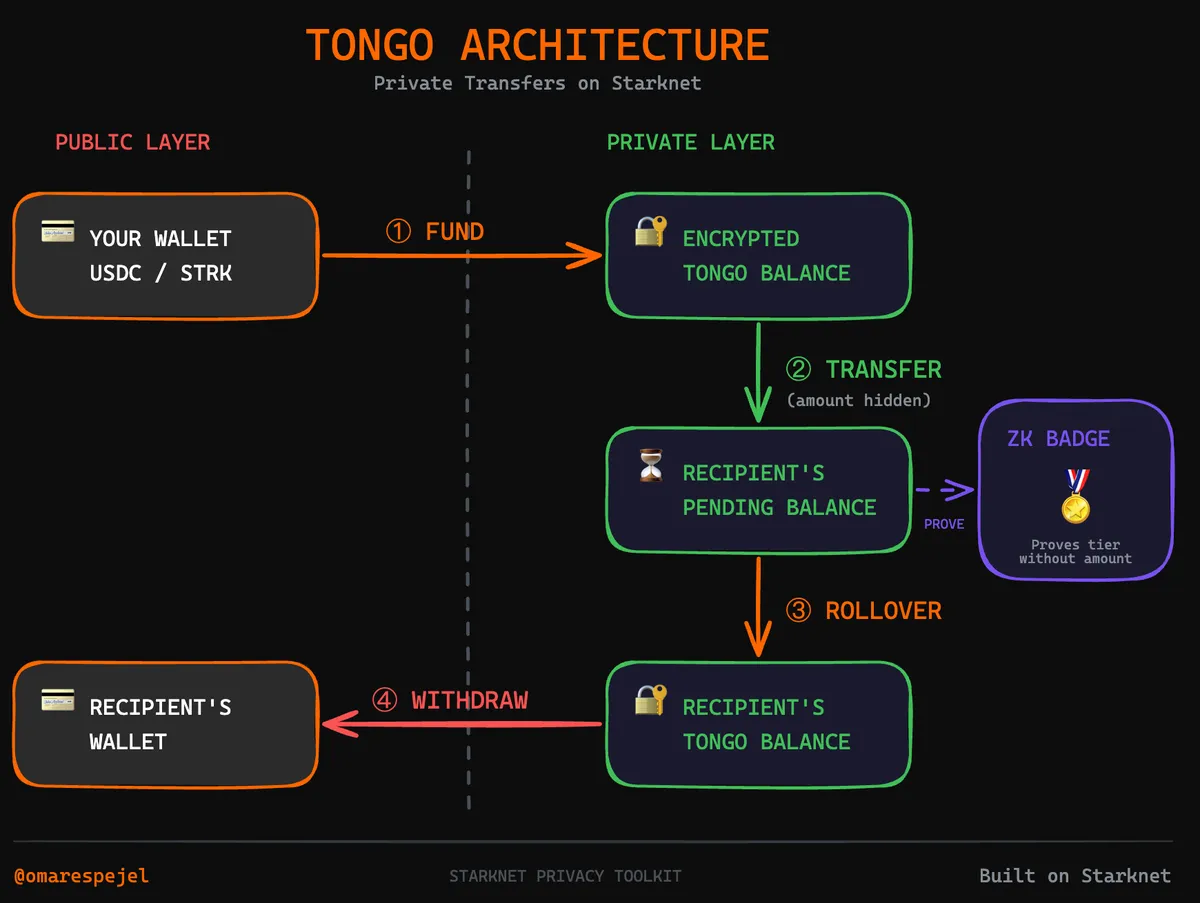
Four operations:
- Fund. Convert public tokens to encrypted balance. This step is public and people see how much you deposit.
- Transfer. Send encrypted amounts. Amount and recipient are hidden from everyone except the recipient.
- Rollover. Claim incoming transfers. Your balance increases but the amounts stay hidden.
- Withdraw. Convert back to public tokens. This step is also public.
Key concepts
- Tongo private key. A 256 bit secret. This is not your wallet key. It is a separate key for Tongo. Lose it and you lose your funds.
- Tongo public key. Derived from the private key. Share this to receive transfers.
- Encrypted balance. Your balance is stored on chain but encrypted. Only you can read it.
- Pending balance. Incoming transfers land here first. You use rollover to claim them.
Generate a key
See tongo-key-manager.ts for the full implementation:
const key = '0x' + crypto.randomBytes(32).toString('hex');
Store this somewhere safe. It's the only way to access your Tongo funds.
Privacy guarantees
This is important to understand:
Fund is public. Everyone sees how much you deposit. This is unavoidable because the tokens have to come from somewhere.
Transfer is private. Amount and recipient are hidden. Only you and the recipient know.
Rollover is private. You're claiming your pending balance. The amount stays hidden.
Withdraw is public. The amount becomes visible again.
The pattern: public → private → private → public. Your privacy window is between fund and withdraw.
12. The web interface
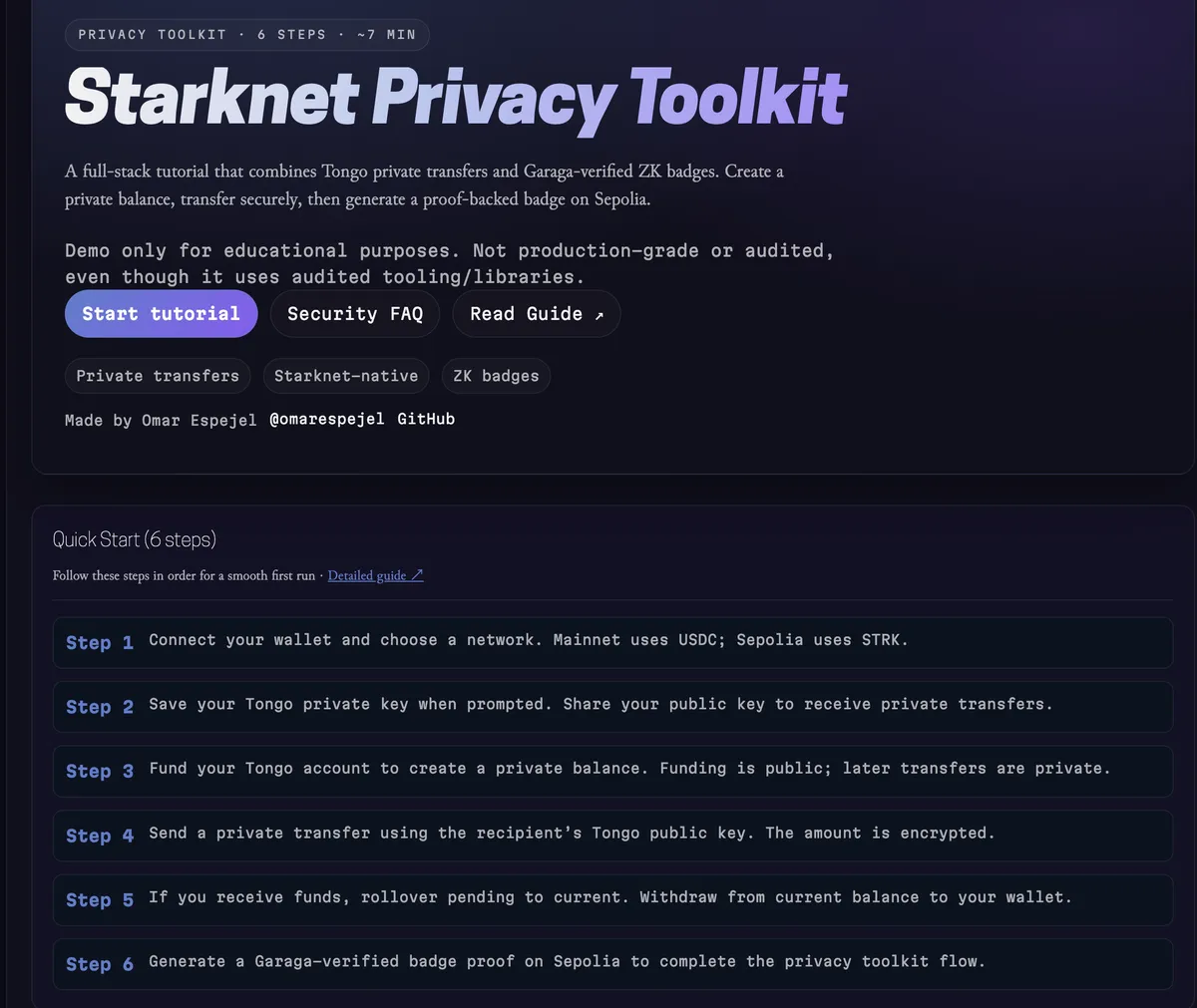
If you don't want to use the command line:
- Connect wallet (Braavos or ArgentX)
- Choose network (Mainnet or Sepolia)
- Fund your Tongo balance
- Transfer privately
- Claim your badge
The proof generation happens on a backend server. Make sure it's running and the UI will show the connection status. The frontend calls the badge-service.ts which coordinates everything.
If the badge panel says "Proof Server: Offline", check that port 3001 is public in Codespaces, and paste your Codespaces URL into the Proof API URL field in the UI.
13. Putting it together
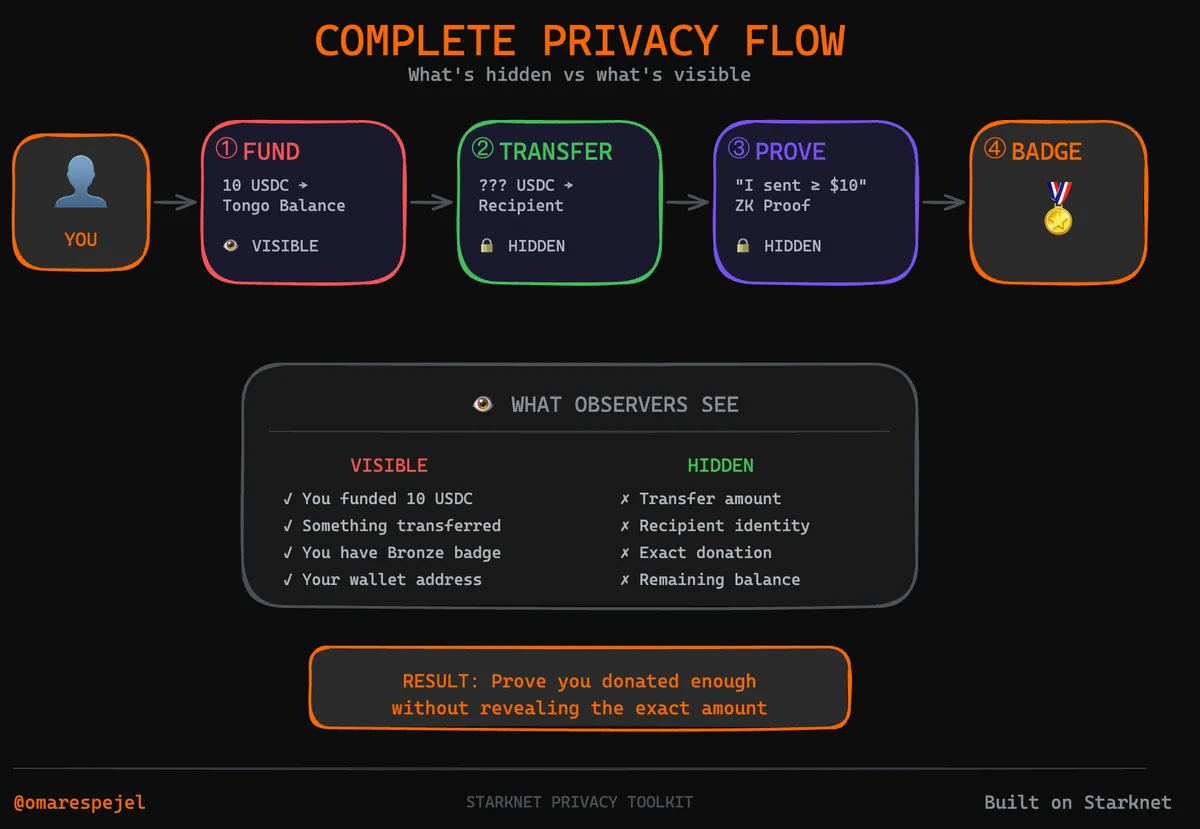
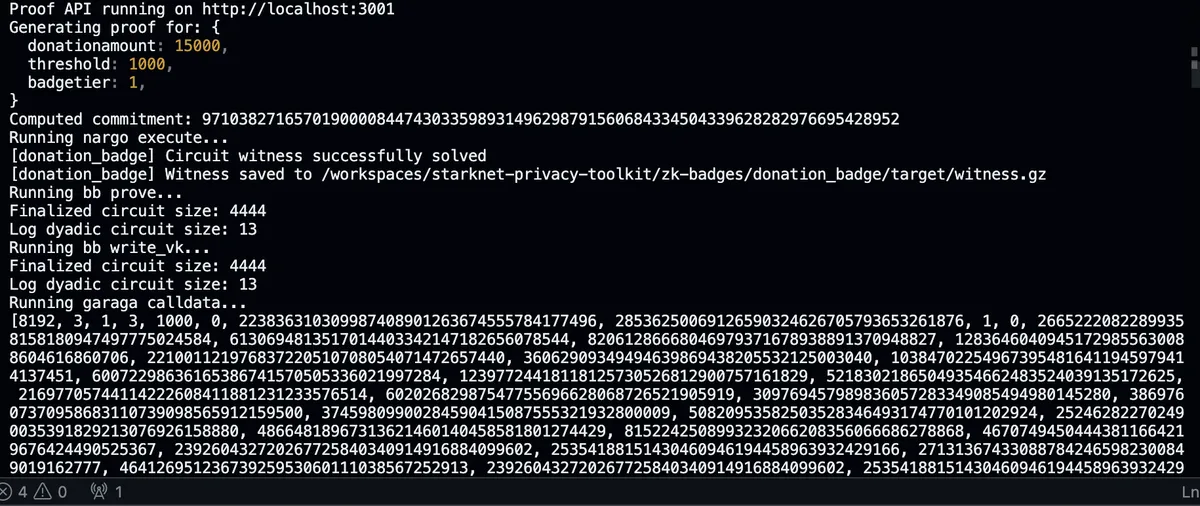
The full flow:
- Fund: deposit tokens into Tongo (public entry, everyone sees)
- Transfer: send to recipient privately (amount hidden)
- Prove: generate ZK proof showing amount > threshold
- Claim: mint badge on chain
What the world sees: you deposited some amount, you have a badge. What they don't see: the exact amount you transferred, who received it.
14. What's actually protected
Let me be clear about the threat model.
Protected:
- Transfer amounts, encrypted on chain.
- Exact donation amounts, only the threshold is revealed.
- Commitment binding, you cannot reuse proofs.
Not protected:
- Wallet addresses, still public.
- Transaction timing, visible on chain.
- Badge ownership, the badge itself is public.
If you need stronger privacy, use fresh wallets, don't reuse secrets, and add delays between operations.
15. The bigger picture
This toolkit is part of a larger privacy stack being built on Starknet:
- Private balances: Tongo, live.
- ZK credentials: Garaga, live.
- Unlinkable addresses: stealth addresses, coming.
- Transaction mixing: MIST.cash, in development.
16. Resources
The tools:
- Noir: circuit language
- Barretenberg: proof backend
- Garaga: Starknet verifiers
- Our circuit: the Noir code in this repo
Tongo:
- Tongo: protocol docs
- Tongo SDK: TypeScript integration
- tongo-config.ts: network configuration in this repo
Starknet:
- Starknet: the L2
- Cairo Book: contract language
- Starknet Foundry: dev tools
- Voyager: block explorer
Wallets:
17. Build your own
This is a template. Fork it. Feed it to your LLM. Build your own thing. Start with the template folder which has minimal examples. The donation badge is one instantiation. You should fork it and build something else.
gh repo fork starknet-edu/starknet-privacy-toolkit
git clone https://github.com/starknet-edu/starknet-privacy-toolkit.git
cursor starknet-privacy-toolkit
Tell the AI:
- "Change this to verify users are over 18"
- "Adapt the circuit for credit score verification"
- "Create a token gated membership proof"
- "Build salary verification for loan applications"
The circuit is 10 lines. The contract is 30 lines. The infrastructure handles the hard parts.
Ideas:
- Age verification for age restricted content
- Credit score attestations for DeFi lending
- Accredited investor verification for token sales
- Token gated access without revealing holdings
- Salary verification for apartment rentals
- DAO membership proofs
- Private voting systems
- Anonymous whistleblower credentials
The primitives are here. Private transfers work. ZK credentials work. Now build something useful with them. Strap in.